
How to Make Money with a Website and Grow Its Visibility Using Smart Tools
Having a website today is more than just a digital presence, it’s a real opportunity to generate income.
Whether through advertising, sales, services, or affiliate programs, success depends on two key factors: web traffic and performance optimization.
1. Define How You Will Monetize Your Website
Before you start driving traffic, you need to decide how your website will make money:
-
Advertising (Google AdSense, private ad networks)
-
Affiliate marketing (Amazon, AliExpress, niche programs)
-
Selling your own products or services
-
Subscriptions or memberships
-
Sponsored content and collaborations
The key is to pick a model that best matches your audience.
1.a. Advertising (Google AdSense and private ad networks)
How it works: You place ads on your website and earn money every time a visitor clicks (CPC) or every thousand impressions (CPM).
- Google AdSense: This is the easiest option to get started. You just need original content and comply with its policies.
- Private or direct networks: When your website has more traffic, you can negotiate with brands or use platforms like Ezoic, Mediavine, or AdThrive, which generally pay better than AdSense.
- Example: If your website receives 50,000 visits per month, with an RPM (revenue per thousand visits) of €5, you could earn around €250 per month from advertising alone.
1.b. Affiliate Marketing
How it works: You recommend products on your website through reviews or mentions and earn a commission for every sale generated from your website.
- Amazon Affiliates: easy to use, although with small commissions (2% – 10%).
- AliExpress Affiliates: useful if your audience is looking for affordable products.
- Niche programs: these are the most profitable because they offer higher commissions (e.g., software, courses, web hosting).
- Example: If you write an article like "Best Mini PCs 2025" and include Amazon affiliate links, every time someone buys a Beelink U59 from your link, you'll earn a commission.
1.c. Selling your own products or services
How it works: You use your website as an online store or showcase.
- Digital products: ebooks, online courses, templates, software.
- Physical products: merchandising, niche products, dropshipping.
- Services: consulting, web design, content writing.
- Example: If your website is about SEO, you could sell a basic web positioning course or even offer your audit service.
1.d. Exclusive Subscriptions or Memberships
How it works: You charge your users a monthly fee to access premium content or benefits.
- Exclusive content (advanced articles, reports).
- Private community (forum, Telegram/Discord group).
- Special resources (downloads, tools, templates).
- Example: If your website is about online business, you could charge €10/month for access to a private club with guides and weekly updates. With just 100 subscribers, you'd already have €1,000 per month.
1.e. Sponsored Content and Collaborations
How it works: Brands pay you to talk about their products or services on your website.
- Sponsored articles (reviews, comparisons).
- Collaborations with other websites or influencers.
- Social media posts linked to your website.
- Example: If your website becomes well-known in the technology niche, a brand like Beelink could pay you to review its mini PCs.
1.f. Which method of making money is best based on your website traffic?
- If your website has low traffic: start with affiliates and selling services.
- If your website has medium traffic (10,000–50,000 visits/month): add AdSense and a digital product.
- If your website has high traffic (100,000+ visits/month): invest in private ad networks, partnerships, and memberships.
To check your website's traffic, use Lookkle Web Traffic Checker.
2. How to Make Your Website Known
A beautiful design means nothing if nobody visits your site. This is where strategy matters:
-
SEO (Search Engine Optimization): optimize titles, descriptions, and content to rank higher on Google.
-
Social media: share your posts and build a community around your brand.
-
Email marketing: grow a mailing list and provide value directly to your subscribers.
-
Quality backlinks: earn links from authoritative sites in your niche.
2.1. SEO (Search Engine Optimization) — so Google can find you and wants to show you
What is it and how does it work?
Google first crawls (discovers pages), then indexes (stores them in its database), and finally ranks (decides who appears at the top).
Your job is to make it easier for Google to crawl, clarify what your content is about, and demonstrate quality.
Practical Steps
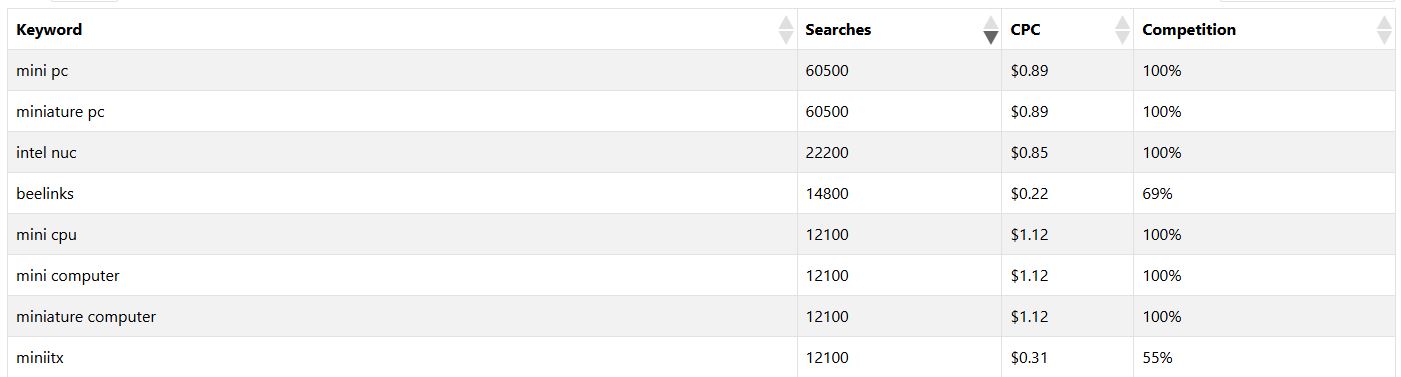
2.1.A. Find Topics and Keywords (What People Are Already Searching For)
- Think about real problems your audience faces ("how to choose a mini PC," "ideas to increase web traffic").
- Type those ideas into Google and see:
- Autocomplete (suggestions).
- "People also ask" (frequently asked questions).
- Related searches at the bottom of the page.
- Use lookkle keyword research.
- Rely on tools. With Lookkle Web Traffic Checker:
- Check organic keywords that drive traffic to your competitors.
- See top pages in your niche: what topics are working for them?
- Look at countries and sources: this guides you on language and content focus.
- Choose one primary keyword per page and 2–4 related secondary keywords.
- Example (tech niche):
- Primary: “best mini PCs 2025” (intent: comparison)
- Secondary: “cheap mini PC”, “Beelink U59 vs…”, “mini PC for office”.
- Example (tech niche):
2.1.B. Write and optimize the page (On-Page)
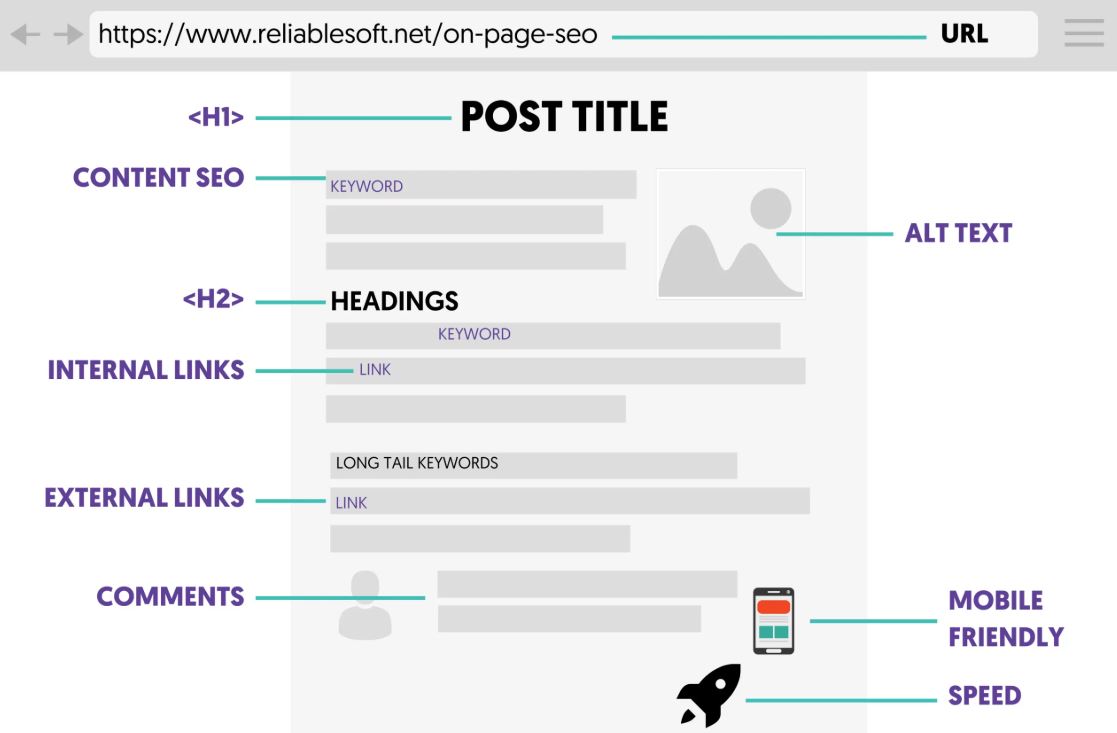
- SEO title (title tag): 55–60 characters, include the keyword at the beginning if possible.
Ex: “Best mini PCs 2025: comparative guide (cheap and powerful)” - Meta description: 140–160 characters, benefit + call to action.
Ex: “We compare mini PCs by price and performance. Discover the ideal one for work or school and avoid purchasing mistakes.” - Short and clear URL: yoursite.com/best-mini-pc-2025
- H1 (visible headline) and subheadings (H2/H3): Table of Contents structure.
E.g., H2: "What to keep in mind," "Comparison," "Frequently Asked Questions." - Useful and specific content: Address the intent. Use lists, tables, and your own images.
- Optimized images: Compress them, name them meaningfully (mini-pc-beelink-u59.jpg), and add a descriptive alt text.
- Internal linking: Link to other related posts/pages with natural anchor text.
- FAQs at the end with real questions; it helps SEO and users.
- Use Seo On Page Checker Tool.
2.1.C. Minimal technical requirements (without going crazy)
- HTTPS (SSL certificate) enabled.
- Responsive design (mobile-first).
- Speed: Compress images, enable caching and lazy-loading; avoid heavy plugins.
- Correct sitemap (/sitemap.xml) and robots.txt.
User-agent: *
Disallow:
Sitemap: https://yoursite.com/sitemap.xml
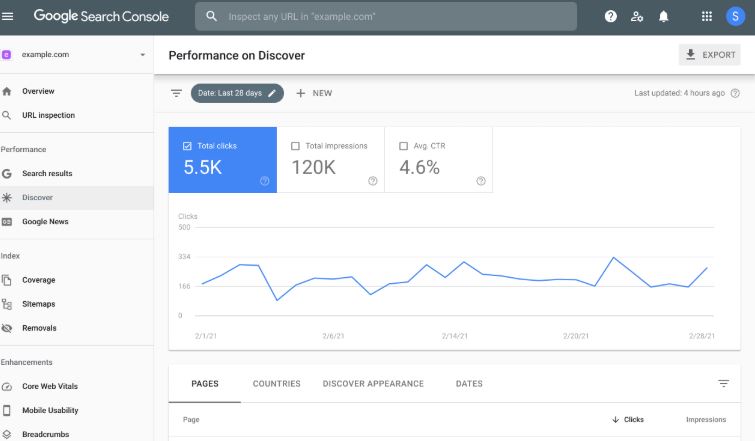
- Indexing: Register your website in Google Search Console and submit your sitemap.
2.1.D. Publish, index, and improve
- Publish, share, and request indexing in Search Console (URL inspection).
- After 15–30 days, review: impressions, clicks, CTR, position.
- Improve titles and content based on data (add missing sections, clarify any questions).
2.2. Social Media — Turn Content into Community and Views
Key Idea for Beginners
You don't need to be on all of them. Choose 1–2 networks where your audience is. If it's tech/business: X (Twitter) and LinkedIn work well; if it's consumer/lifestyle: Instagram and TikTok.
Conversion-Ready Profile
- Bio: Who you are + benefit + call to visit your website.
- Link: To your lead magnet or star post.
- Pinned Post: The best content or a free guide.
What to Post (3E Formula)
- Educate (tips, guides, checklists).
- Entertain (common mistakes, myths, before/afters).
- Start a conversation (questions, surveys, opinions).
Post template (copy and use)
- Hook: “3 Mistakes That Kill Your Website Traffic (and How to Fix Them)”
- Value: 3–5 clear bullets with actionable mini-tips.
- CTA: “Save the post and read the full guide on my website (link in bio).”
Simple cadence (avoids burning out)
- 3 posts/week + 3–5 stories (or 2–3 threads in X).
- 1 short video/week summarizing an article.
Repurpose your blog
One long article =
- 1 thread for X,
- 3 carousel posts (IG/LinkedIn),
- 1 short video,
- 5 tweets/single quotes,
- 1 infographic.
Measure what matters
- Clicks to the site (use UTM on your links).
- Saves/shares (value signal).
- Comments (conversation).
2.3. Email marketing — your “owned audience” that doesn't depend on algorithms
Why it's key
Email sells. You don't depend on social media, and the user has given you permission to write to them.
The basics (legal and technical)
- Use a platform (Mailchimp, Brevo, etc.).
- Double opt-in (confirm subscription).
- Include consent text and privacy policy (GDPR).
How to get subscribers (easy ideas)
- Lead magnet (useful gift):
- Email mini-course.
- Form placement: home, sidebar, below posts, exit popup, dedicated page.
Welcome Sequence (5 emails, ready for copy)
- Day 0 – Welcome + Gift
Subject: “Here’s your audit template!”
Body: Who you are, link to the resource, what to expect.
- Day 2 – Story and Trust
Subject: “How I went from ...”
Body: Your process, values, social proof if you have it.
- Day 4 – How-To Guide
Subject: “The 7 steps I use to ...”
Body: Actionable tips; CTA to a key post.
- Day 6 – Case Study/Template
Subject: “... what exactly changed ...”
Body: Before/After, link to your post web/service.
- Day 8 – Soft Offer
Subject: “Can I help you ...?”
Body: Initial service or product (affordable price).
Weekly newsletter (structure)
- Hook (1–2 lines)
- Main idea (1 actionable tip)
- Recommended resource (your post/guide)
- Mini CTA (respond to this email with your question)
Simple metrics
- Open rate (initial goal: 30%+).
- CTR (3–10%).
- List growth (+/- per week).
- Responses (quality of relationship).
2.4. Quality Backlinks — Getting Other Sites to Recommend You
What Is a Backlink and Why It's Important?
It's a link from another site to yours. Google uses them as a signal of trust and authority (especially if the linking site is relevant and strong).
What should backlinks be like?
- Relevance (same or related topic).
- Authority (respected sites).
- Natural anchor text ("mini PC guide" is better than "click here").
- Diversity (not all the same type).
White Paper Strategies That DO Work
- Guest Posts
- Find blogs in your niche with active content.
- Come up with 2–3 useful and specific headlines.
- Deliver a great article (not an advertorial).
- Linkable assets (things people want to cite)
- Data (studies, benchmarks, surveys).
- Tools/templates (calculators, checklists).
- Definitive guides with downloadable resources.
- Fixing broken links
- Find a broken link in an article on your topic.
- Offer your content as a useful replacement.
- Resource pages/lists
- “Resources for [topic]” on blogs and universities.
- Ask for inclusion if your guide/tool adds value.
- Genuine relationships
- Comment with value, collaborate, participate in communities.
- Support other creators; many will return the favor.
Avoid
- Buying links in bulk, link farms, PBNs, and comment/forum spam. There's a real risk of penalties.
Tracking
With Backlink Checker Tool, check new and lost backlinks and the pages that attract the most links. Duplicate what works.
2.5. 30-Day Plan for Website Setup and Success
Week 1 — Fundamentals
- Set up Search Console, Analytics, Lookkle.
- Fix the technical basics (HTTPS, speed, sitemap, robots).
- Choose 10 keyword-rich topics and create your editorial calendar.
- Create your lead magnet (template/mini-course).
Week 2 — Ranking Content
- Publish 3 pillar articles (2,000+ words, very useful).
- Optimize on-page (title/meta/H2/FAQs/internal links).
- Create 1 resource page (linkable asset).
Week 3 — Distribution and List
- Repurpose each article into threads, carousels, and short videos (3–5 pieces per article).
- Set up forms and launch a 5-email welcome sequence.
- Prepare a list of 20 guest post sites and send 10 pitches.
Week 4 — Authority and Adjustments
- Publish 2 more articles (clusters that link to the pillars).
- Do broken link building (10 opportunities).
- Review metrics in Lookkle/Search Console and adjust titles/FAQs.
- Plan month 2 with what worked best.
2.6. Common Mistakes to Avoid
- Posting without researching search intent. → Validate with Google and adjust the format (guide, comparison, tutorial).
- Being on 5 networks at once. → Choose 1–2 and be consistent.
- Not having a lead magnet. → Create a simple one in 1 day (PDF template).
- Forgetting internal linking. → Each new post should link to 2–3 old ones.
- Buying cheap links. → Invest in relationships and linkable assets.
3. Use Lookkle’s Web Traffic Checker to Analyze and Grow
One of the secrets to making your website popular is measuring and understanding your visitors. That’s where Lookkle Web Traffic Checker comes in. With it, you can:
-
Track where your traffic comes from (organic, social, direct, by country).
-
See user behavior (time on site, bounce rate, top pages).
-
Compare your site with competitors.
-
Discover the keywords driving traffic to your site.
These insights help you adjust your strategy. For example, if a certain country sends you a lot of visitors, you can create content tailored for that audience. If social traffic is low, you’ll know it’s time to boost your presence there.
4. Boost Productivity with the Beelink U59 Mini PC
Managing and growing a website requires a reliable workstation. The Beelink U59 mini PC is an excellent option for digital creators because:
-
It features a low-power Intel Celeron processor designed for smooth multitasking.
-
Compact and quiet, it fits perfectly in a minimalist workspace.
-
Powerful enough to run SEO tools, text editors, spreadsheets, and multiple browser tabs.
-
Energy-efficient, making it cost-effective for long working sessions.
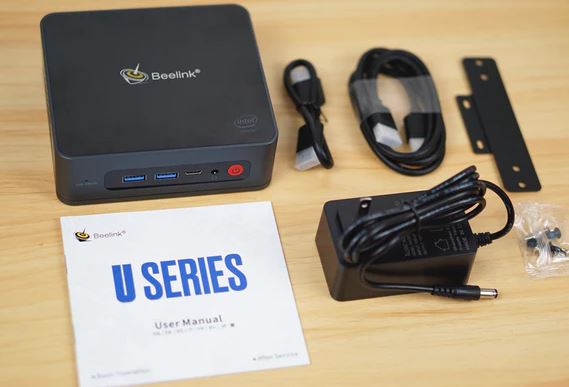
With this setup, you can manage your website, run Lookkle analytics, and create content without dealing with slowdowns or overheating.
Online legit Business that pays